I have a RadzenDataGrid bound to an IQueryble configured to use virtualization just like in the online demo. Now that the data is increasing I see that the virtualization ist not working as expected. In EF-Core Query-Logs I can see that first there are 2 calls are made to fetch all datasets (no skip, top) which are really slow. Afterwards all seems to be worked as expected, since follow up calls are only partials. I removed anything but the bare DatGrid definition.
thanks for your reply. I would really like to do so but it’s not that easy to realise with the online samples. To reproduce what I see in my local logs I need to enable EFCore-Logging to see what queries are actually send to the database, but I am not able to do so in the playground without having access to the program.cs…
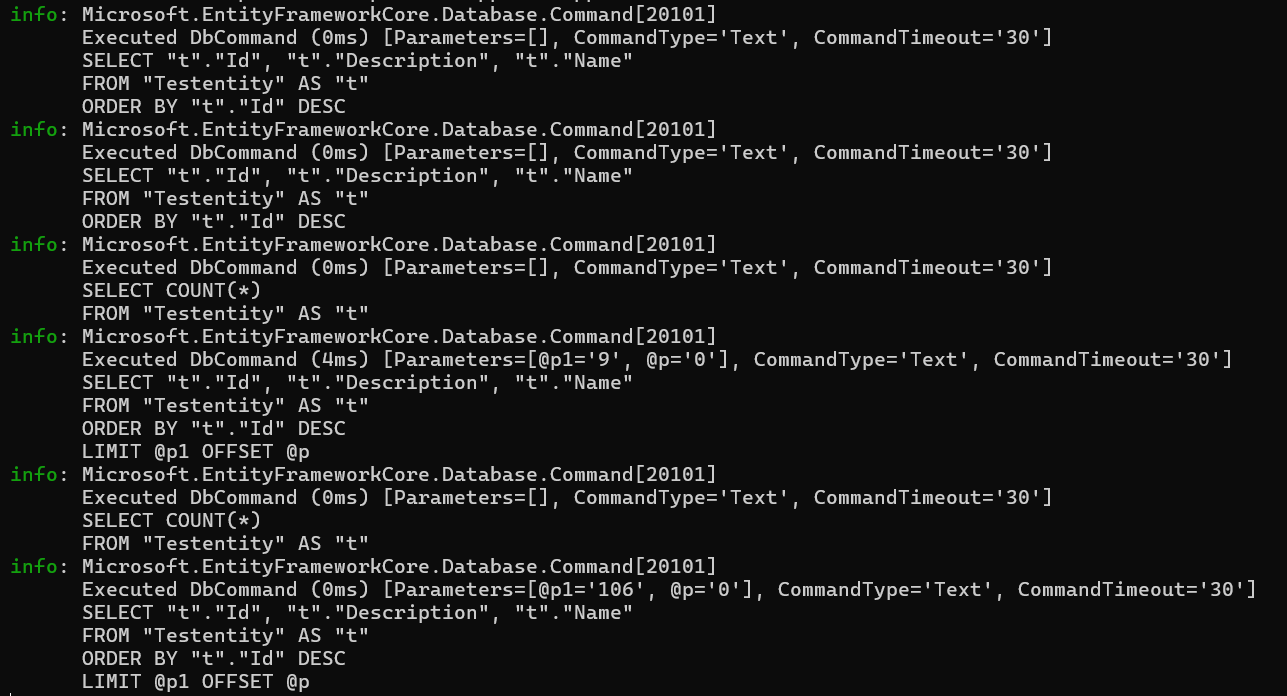
I build an testapp fro reproducing the issue and attached it to this thread. In the main console of the application you can see the SQL-querries beeing executed.
The 2 fully queries at the beginning don’t make sense here, because they are destroying benefits of using virtualization here. In the sample app this has no big influence but it has once you start using more complex data structures.
yes I forgot to add this in my sample project. But as already mentioned in a previous post this doesn’t solve the issue. I added a modified version so you can prove yourself.
I’ve just published update to Radzen.Blazor (10.4.1) - you can disable also prerender (`<Routes @rendermode="new InteractiveServerRenderMode(prerender: false)" />`) to minimize even more the database calls.
 . That small bugfix improved the loading times of my DataGrid massively