Hi,
I use the scheduler in Month view to show details of events that span multiple days. We style the events according to some attributes. One of these is adding a shading to the start of the event as below:
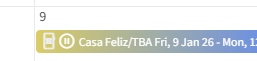
If the event spans multiple rows on the calendar, that event is rendered with the same shading on the second row, even though technically it’s the last day of the event:
Is there any way to prevent this happening (I understand why it’s like this, just not sure how to deal with it)?
TIA
Andy.
Hi @andymarksonline,
The event element is getting the same attributes which is why it gets the same styling applied. Not sure if this can be prevented unless you somehow check if you have already set this attribute already for the same event. Can't tell more as I don't know your actual implementation.
Hi @korchev I use the EventRender callback and set the background color of the event accordingly:
 protected void EventRender(SchedulerAppointmentRenderEventArgs<CalendarEventDto> args)
 {
  args.Attributes["style"] = "linear-gradient(90deg,rgba(209, 192, 63, 1) 0%, rgba(49, 104, 245, 1) 38%)";
The event is split into two divs by the scheduler as it’s spread across two rows. Both divs end up with the same style attributes (which is exactly what I would expect it to do). I can’t see anything where I can capture the rendering of an individual div (which may form part of an event)?
Indeed the attributes from EventRender are applied to all elements rendered for an event (and this is by design). I don't think there is a way around that.
Hi @andymarksonline
What about checking if the appointment being rendered has a start date that is less than the slot date, and if it has, do not apply the gradient. Just the ‘blue’
EDIT - Ignore this. On reflection, I don’t think the slot date is passed with the SchedulerAppointmentRenderEventArgsclass.
As @akorchev suggests, probably the best way would way would be to create a list to hold the unique ID of appointments as they are rendered and then change the way the attribute is set if it already exists in the list.
Regards
Paul
I think as @korchev stated above, the style gets applied to each element rendered for an event, this is built into the component. It would be good to have a flag to say “apply the style to only the first element”, or allow a style for the first, intermediate, and last elements rendered but I appreciate this is a very unique use case!
Thanks guys.
