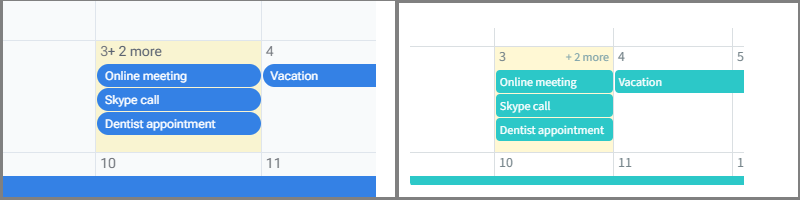
Below is the code I’ve been using to test. You’ll see the scheduler height is set to a percentage. As you change the slider, it seems to react perfectly.
@inject DialogService DialogService

<RadzenStack Orientation="Orientation.Horizontal" AlignItems="AlignItems.Center" Gap="0.5rem" class="rz-p-4 rz-mb-6 rz-border-radius-1" Style="border: var(--rz-grid-cell-border);height:4rem;">

    <RadzenLabel Text="Show Header:  " />

    <RadzenSwitch @bind-Value=@showHeader />

    <RadzenLabel Text="Scheduler Height:" />

    <RadzenSlider @bind-Value=@schedulerHeight TValue="int" Min="30" Max="100" Style="margin-left:1.5rem;margin-right:1.5rem;" Change="SchedulerHeightChange" />

    <RadzenLabel Text="@($"{schedulerHeight}")" />

</RadzenStack>

<RadzenScheduler @ref=@scheduler SlotRender=@OnSlotRender style="@($"height: {schedulerHeight}%;")" TItem="Appointment" Data=@appointments StartProperty="Start" EndProperty="End" ShowHeader=@showHeader

                 TextProperty="Text" SelectedIndex="2"

    SlotSelect=@OnSlotSelect AppointmentSelect=@OnAppointmentSelect AppointmentRender=@OnAppointmentRender DaySelect="@OnDaySelect"

    AppointmentMove=@OnAppointmentMove >

    <RadzenDayView />

    <RadzenWeekView />

    <RadzenMonthView />

    <RadzenYearPlannerView />

    <RadzenYearTimelineView />

    <RadzenYearView />


</RadzenScheduler>


<EventConsole @ref=@console />


@code {

    RadzenScheduler<Appointment> scheduler;

    EventConsole console;

    Dictionary<DateTime, string> events = new Dictionary<DateTime, string>();

    int schedulerHeight { get; set; } = 50;


    bool showHeader = true;


    void SchedulerHeightChange()

    {

        StateHasChanged();

    }


    IList<Appointment> appointments = new List<Appointment>

    {

        new Appointment { Start = DateTime.Today.AddDays(-2), End = DateTime.Today.AddDays(-2), Text = "Birthday" },

        new Appointment { Start = DateTime.Today.AddDays(-11), End = DateTime.Today.AddDays(-10), Text = "Day off" },

        new Appointment { Start = DateTime.Today.AddDays(-10), End = DateTime.Today.AddDays(-8), Text = "Work from home" },

        new Appointment { Start = DateTime.Today.AddHours(10), End = DateTime.Today.AddHours(12), Text = "Online meeting" },

        new Appointment { Start = DateTime.Today.AddHours(10), End = DateTime.Today.AddHours(13), Text = "Skype call" },

        new Appointment { Start = DateTime.Today.AddHours(14), End = DateTime.Today.AddHours(14).AddMinutes(30), Text = "Dentist appointment" },

        new Appointment { Start = DateTime.Today.AddHours(15), End = DateTime.Today.AddHours(16), Text = "Team standup" },

        new Appointment { Start = DateTime.Today.AddHours(16), End = DateTime.Today.AddHours(17), Text = "Code review" },

        new Appointment { Start = DateTime.Today.AddDays(1), End = DateTime.Today.AddDays(12), Text = "Vacation" },

    };


    void OnDaySelect(SchedulerDaySelectEventArgs args)

    {

        console.Log($"DaySelect: Day={args.Day} AppointmentCount={args.Appointments.Count()}");

    }


    void OnSlotRender(SchedulerSlotRenderEventArgs args)

    {

        // Highlight today in month view

        if (args.View.Text == "Month" && args.Start.Date == DateTime.Today)

        {

            args.Attributes["style"] = "background: var(--rz-scheduler-highlight-background-color, rgba(255,220,40,.2));";

        }


        // Highlight working hours (9-18)

        if ((args.View.Text == "Week" || args.View.Text == "Day") && args.Start.Hour > 8 && args.Start.Hour < 19)

        {

            args.Attributes["style"] = "background: var(--rz-scheduler-highlight-background-color, rgba(255,220,40,.2));";

        }

    }


    async Task OnSlotSelect(SchedulerSlotSelectEventArgs args)

    {

        console.Log($"SlotSelect: Start={args.Start} End={args.End}");


        if (args.View.Text != "Year")

        {

            Appointment data = await DialogService.OpenAsync<AddAppointmentPage>("Add Appointment",

                new Dictionary<string, object> { { "Start", args.Start }, { "End", args.End } });


            if (data != null)

            {

                appointments.Add(data);

                // Either call the Reload method or reassign the Data property of the Scheduler

                await scheduler.Reload();

            }

        }

    }


    async Task OnAppointmentSelect(SchedulerAppointmentSelectEventArgs<Appointment> args)

    {

        console.Log($"AppointmentSelect: Appointment={args.Data.Text}");


        var copy = new Appointment

        {

            Start = args.Data.Start,

            End = args.Data.End,

            Text = args.Data.Text

        };


        var data = await DialogService.OpenAsync<EditAppointmentPage>("Edit Appointment", new Dictionary<string, object> { { "Appointment", copy } });


        if (data != null)

        {

            // Update the appointment

            args.Data.Start = data.Start;

            args.Data.End = data.End;

            args.Data.Text = data.Text;

        }


        await scheduler.Reload();

    }


    void OnAppointmentRender(SchedulerAppointmentRenderEventArgs<Appointment> args)

    {

        // Never call StateHasChanged in AppointmentRender - would lead to infinite loop


        if (args.Data.Text == "Birthday")

        {

            args.Attributes["style"] = "background: red";

        }

    }


    async Task OnAppointmentMove(SchedulerAppointmentMoveEventArgs args)

    {

        var draggedAppointment = appointments.FirstOrDefault(x => x == args.Appointment.Data);


        if (draggedAppointment != null)

        {

            var duration = draggedAppointment.End - draggedAppointment.Start;


            if (args.SlotDate.TimeOfDay == TimeSpan.Zero)

            {

                draggedAppointment.Start = args.SlotDate.Date.Add(draggedAppointment.Start.TimeOfDay);

            }

            else

            {

                draggedAppointment.Start = args.SlotDate;

            }


            draggedAppointment.End = draggedAppointment.Start.Add(duration);


            await scheduler.Reload();

        }

    }

}
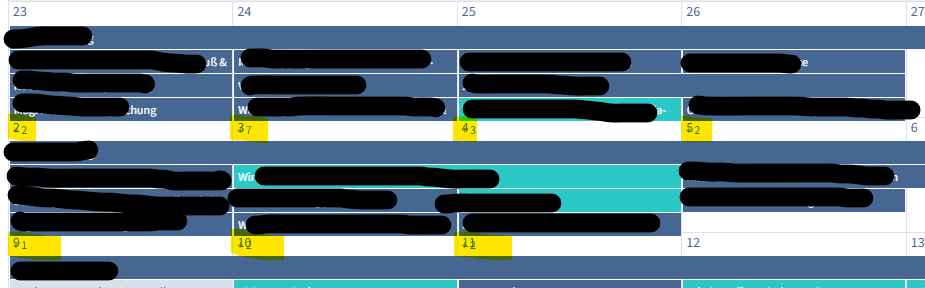
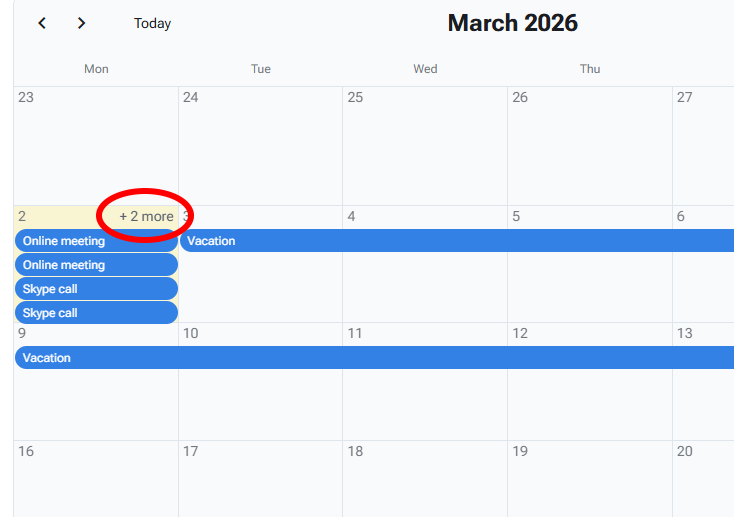

 Do you think there is a way to use percentage height? I am not so sure as events are rendered in a different element than the slot.