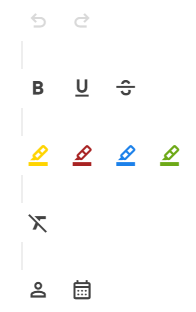
I changed the compoent’s version from 10.4.9 to 11.1.0 and all RadzenHtmlEditor’s toolbar has been changed and appears with unnecessary line breaks. Previously, these appeared side by side.
The HtmlEditor toolbar was updated to match the new Spreadsheet toolbar styling introduced in the latest versions. If the toolbar items are wrapping unexpectedly, this is most likely caused by an outdated custom theme, custom CSS overrides, or a cached older Radzen stylesheet.
Please try the following:
Clear the browser cache / hard refresh the page.
Make sure the Radzen CSS/theme file loaded by the app matches the installed Radzen.Blazor package version.
Check for custom CSS targeting classes such as .rz-toolbar, .rz-html-editor-toolbar, toolbar buttons, or separators, as older overrides may no longer work correctly with the updated toolbar styling.