RadzenHtmlEditor behaviour in newer versions

We are trying to update to a new version of Radzen.Blazor, but the RadzenHtmlEditor in newer versions does not behave in the same way as we are currently used to.

Version 7.3.4 is te last version that works as we expect it to work.

Expected behaviour (version 7.3.4 and below):

We copy and paste excel fields into the RadzenHtmlEditor:
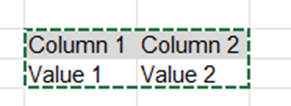
In the Paste handler we parse and edit the pasted content if it is from excel:

async Task<string> OnPaste(HtmlEditorPasteEventArgs args)
{
    if (args.Html.Contains("content=Excel.Sheet"))
    {

The Paste handler shows the following value for args.Html:

<html xmlns:v="urn:schemas-microsoft-com:vml"\r\nxmlns:o="urn:schemas-microsoft-com:office:office"\r\nxmlns:x="urn:schemas-microsoft-com:office:excel"\r\nxmlns="http://www.w3.org/TR/REC-html40">\r\n\r\n<head>\r\n<meta http-equiv=Content-Type content="text/html; charset=utf-8">\r\n<meta name=ProgId content=Excel.Sheet>\r\n<meta name=Generator content="Microsoft Excel 15">\r\n<link id=Main-File rel=Main-File\r\nhref="………..">\r\n<link rel=File-List\r\nhref="f…cing=0 width=144 style='border-collapse:\r\n collapse;width:108pt'>\r\n<!--StartFragment-->\r\n <col width=72 span=2 style='width:54pt'>\r\n <tr height=19 style='height:14.25pt'>\r\n  <td height=19 class=xl65 width=72 style='height:14.25pt;width:54pt'>Column 1</td>\r\n  <td class=xl65 width=72 style='width:54pt'>Column 2</td>\r\n </tr>\r\n <tr height=19 style='height:14.25pt'>\r\n  <td height=19 style='height:14.25pt'>Value 1</td>\r\n  <td>Value 2</td>\r\n </tr>\r\n<!--EndFragment-->\r\n</table>\r\n\r\n</body>\r\n\r\n</html>\r\n

After parsing and editing the value in args.Html we have the following result:

<table class='inserted-table'>\r\n<!--StartFragment-->\r\n \r\n <tr>\r\n  <th>Column 1</th>\r\n  <th>Column 2</th>\r\n </tr>\r\n <tr>\r\n  <td>Value 1</td>\r\n  <td>Value 2</td>\r\n </tr>\r\n<!--EndFragment-->\r\n</table>"

The issue (version 7.3.5+):

Starting from version 7.3.5 when we paste the same cells from excel we see that we receive this in our Paste handler:

<col width=72 span=2 style='width:54pt'>\r\n <tr height=19 style='height:14.25pt'>\r\n  <td height=19 class=xl65 width=72 style='height:14.25pt;width:54pt'>Column 1</td>\r\n  <td class=xl65 width=72 style='width:54pt'>Column 2</td>\r\n </tr>\r\n <tr height=19 style='height:14.25pt'>\r\n  <td height=19 style='height:14.25pt'>Value 1</td>\r\n  <td>Value 2</td>\r\n </tr>

I can understand removing a lot of the overhead, but why is the table tag removed? Without the table tag it it will not display as a table in the editor:

We can work around this by adding the table tag ourselves, but not being able to see that the content came from excel might cause issues when pasting other data as checking to see if it starts with ‘<col’ is not as secure as checking if it contains “Excel.Sheet”.

A bigger issue starts to show when using the latest version 9.0.X, if we paste the excel cells they are automatically converted to an image. The Paste handler show this value for args.Html:

<img src="data:image/png;base64,iVBORw0KGgoAAAANSUh.......AABJRU5ErkJggg==">

While this makes the pasted cells look identical to the cells in excel, this also means that it is impossible to edit and style the table in the editor which is not a workable solution for us.

Is it possible to prevent the conversion to image? If not, we either need to stay on a lower version (which is not acceptable in the long run) or we need to find another library/create our own editor (which is also not ideal).

I suspect something from this commit is causing this behavior. What browser are you pasting in?

UPDATE: I reproduced it in Edge. The linked pull request is indeed causing the problem as Excel adds a file in the clipboard as well (the image). We will try to address that issue with the next release.

Thanks for the quick response!

Great to hear that the image issue will be addressed.

Will this also be addressed, or is the table tag removed on purpose?

I can understand removing a lot of the overhead, but why is the table tag removed? Without the table tag it it will not display as a table in the editor:

That comes from a different PR that explicitly splits the content by MS Office inserted markers to remove HTML (such as <html><head><meta> from the editor content. We prefer to keep that change as it is.

I understand wanting to remove the MS Office related markers, that added a lot of overhead and it makes sense to remove it.

But without the table tag it becomes incorrect html, where the tr, td and col tag will be ignored.

Without the table tag the excel example from my first post will paste like this:

This is the html from the args.Html in the Paste handler

<col width=72 span=2 style='width:54pt'>\r\n <tr height=19 style='height:14.25pt'>\r\n  <td height=19 class=xl65 width=72 style='height:14.25pt;width:54pt'>Column 1</td>\r\n  <td class=xl65 width=72 style='width:54pt'>Column 2</td>\r\n </tr>\r\n <tr height=19 style='height:14.25pt'>\r\n  <td height=19 style='height:14.25pt'>Value 1</td>\r\n  <td>Value 2</td>\r\n </tr>

And looking in the browser dev tools we can see that the tr, td and col tags are indeed ignored:

This is how it is rendered if the table tag is added:

I am afraid we don't have a solution for that. What did you do before this change with the extra HTML markup?

If it is a paste from excel we extract the table part from the html:

    async Task<string> OnPaste(HtmlEditorPasteEventArgs args)
    {
          if (args.Html.Contains("content=Excel.Sheet"))
          {
              int from = args.Html.IndexOf("<table");
              int to = args.Html.LastIndexOf("</table>") + "</table>".Length;
              if (from > -1 && to > -1)
              {
                  var strippedHtml = args.Html.Substring(from, to - from);
                  strippedHtml = RemoveHtmlAttributes(strippedHtml);
                  strippedHtml = await AddStyleToHtmlTable(strippedHtml);
                  args.Html = strippedHtml;
              }
          }
        return args.Html;
    }

Then we remove all the html attributes

   private string RemoveHtmlAttributes(string html)
   {
       Regex rg = new Regex(@"<([a-z][a-z0-9]*)[^>]*?(/?)>");
       return rg.Replace(html, "<$1$2>");
   }

Now that all the attributes have been removed we can easily find and replace the html tags that we do not want and in case of the table tag we add our own css class to make sure all pasted tables are styled the same by default:

    private async Task<string> AddStyleToHtmlTable(string html, int searchPosition = 0)
    {
        ...
        // Some code irrelevant to this issue:
        // It shows a dialog to ask if the first row is a header, if yes replace the td    in the first row th
        ...


        html = html.ReplaceFirst("<table>", "<table class='inserted-table'>")
                  .Replace("<tbody>", "")
                  .Replace("</tbody>", "")
                  .Replace("<colgroup>", "") 
                  .Replace("</colgroup>", "")
                  .Replace("<col>", "");
        return html;
    }

I can only suggest to append <table> tags if missing.

By the way here is how pasting from excel looks like with the fix applied:


Looks good and seems like the table tag is also included.

Maybe the table tag issue was already fixed in a smaller v8 release? The test I did that didn’t show the table tag was done with 8.0.0 as the latest v8 had the image issue.

And even if we do end up needing to add the table tag ourselves it will be ok as we need to parse the html to add our styling class anyway.

Thanks again for the quick response!