Hello everyone! For some reason fonts are not being applied to buttons. I created a new WASM project from the ground up and take a look how the button text is totally different from what we saw on every demo.
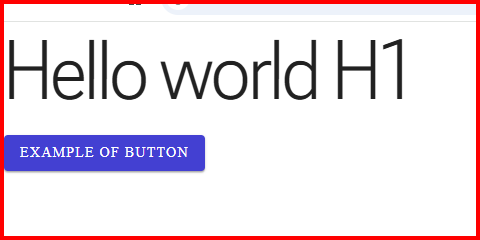
The theme applies the text font to body only when the page contains a RadzenLayout (the rule is :root:has(.rz-layout) body { font-family: var(--rz-text-font-family) }). All our demos are rendered inside a RadzenLayout, which is why the buttons there use the theme font. RadzenButton uses font-family: inherit, so in your project it inherits the browser default (Times New Roman) from body. The RadzenText H1 looks right because the typography classes set the font on the element itself.
You have two options:
- Wrap your page content in
RadzenLayout/RadzenBody(this is what the Radzen Blazor project template does):
<RadzenLayout>
    <RadzenBody>
        @Body
    </RadzenBody>
</RadzenLayout>
- If you don't want the layout component, set the font on
bodyyourself in your app's CSS after the theme stylesheet:
body {
    font-family: var(--rz-text-font-family);
}
Understood, and it’s working. Thanks!!!