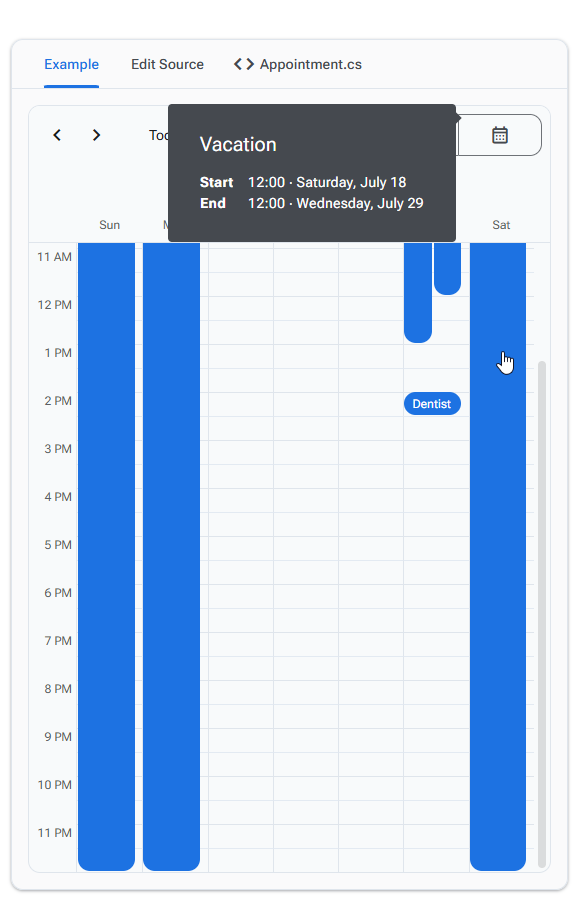
If you mouse over the “Vacation” item which goes to Saturday on the demo, the tooltip opens to the right, offscreen, triggering the horizontal scroll bar. Can the tooltip logic account for rendering offscreen?
Something like: Right offscreen switch to Left => If left is also off screen like the full week of Vacation, then top, then bottom.
Can we also get the AppointmentData added as a property on SchedulerAppointmentMouseEventArgs passed into AppointmentMouseEnter so we have more details about what element was moused over.
Thanks for the tip. I’ll try that out, it’d still be nice if other positions were as dynamic.
I changed the Position to Bottom on the demo and on the last row, the ToolTip doesn’t show and my cursor flashes between pointer and finger. The recording captured it a little bit at the end, but on my screen it’s flash back and forth so fast it looks like a single cursor with both combined.
Indeed at the moment “smart” positioning will work only if Position is not defined or is set to Bottom. We will do our best to imrove this in our 11 branch - the release of our v11 will be before the end of the month.
I tried TooltipPosition.Left & TooltipPosition.Right and in my case they display as expected; (They display in the desired side unless there is no space then the tool tip switches sides).
One thing i Noticed is that for the tool tip position left and right it always anchor the tool tip to the start of the appointment shape. If there is a vertical scroll bar and the start of the appointment’s shape is outside the view area then the tooltip will display where the shape would have started (outside the view area) (see screenshot).