Query Filter: System.Linq.Dynamic.Core.Exceptions.ParseException

I have a crud page that has a grid table. When I open the page, it immediately has an error:

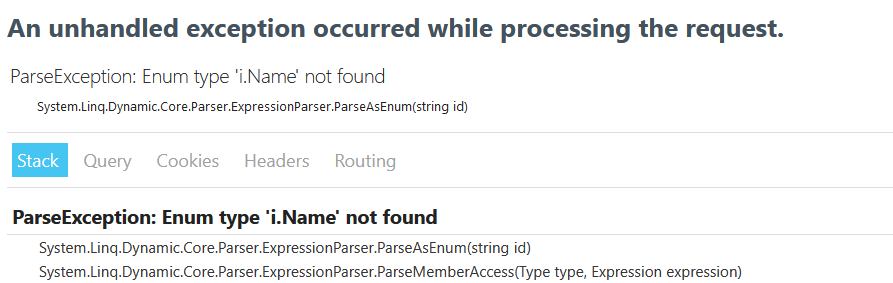
System.Linq.Dynamic.Core.Exceptions.ParseException: 'Enum type 'i.Name' not found'

The error comes from this method:

public async Task<IQueryable<Kiosk>> GetKiosks(Query query = null)
{
	var items = Context.Kiosks.AsQueryable();

	if (query != null)
	{
		if (!string.IsNullOrEmpty(query.Expand))
		{
			var propertiesToExpand = query.Expand.Split(',');
			items = propertiesToExpand.Aggregate(items, (current, p) => current.Include(p.Trim()));
		}
		
		// ERROR INSIDE THE IF STATEMENT
		if (!string.IsNullOrEmpty(query.Filter))
			items = query.FilterParameters != null
				? items.Where(query.Filter, query.FilterParameters)
				: items.Where(query.Filter);

		if (!string.IsNullOrEmpty(query.OrderBy)) items = items.OrderBy(query.OrderBy);

		if (query.Skip.HasValue) items = items.Skip(query.Skip.Value);

		if (query.Top.HasValue) items = items.Take(query.Top.Value);
	}

	return await Task.FromResult(items);
}

I'm not sure what I have to do to fix this issue. I'm new to Radzen.

If you need more information, pls let me know.

You've entered somewhere in your page invalid filter expression. Check DataGrid LoadData event, data source method invoke query:

By default is just the DataGrid filter:

1 Like

Thank you for your reply.

I'm not familiar with Radzen IDE, could I do it manually?

This is the call from the page:

protected override async Task OnInitializedAsync()
{
	stations = await AppDbService.GetStations(
                new Query { Filter = $@"i => i.Name.Contains(@0) || i.Address.Contains(@0) || i.City.Contains(@0) || i.State.Contains(@0)", 
                    FilterParameters = new object[] { search } });
}

Ah sorry! You are using Radzen Blazor Studio? In this case you can simply change the code in the way you want.

1 Like

Could you show me how I can edit this?

You can open the page in Radzen Blazor Studio and simply change the code in the way you want:

1 Like

@enchev I know I can edit, I apologize this is my first time with Radzen Query.

The @0 what does it mean? and what should I change it to?

new Query { Filter = $@"i => i.Name.Contains(@0) || i.Address.Contains(@0) || i.City.Contains(@0) || i.State.Contains(@0)", FilterParameters = new object[] { search } }

This is index of a parameter passed as FilterParameters

1 Like

I will learn more about the query and check out samples.

Thank you sir.

Check if the properties used in the expression are present and they a strings.

1 Like

Can you also paste here the declaration of the Station class (I assume this is what the GetStations method returns).

1 Like

@enchev,@korchev The station is ok, but the kiosk is where I get the ParseException: Enum type 'i.Name' not found issue upon loading the page, sry for the mix up.

public class Kiosk
{
    [Key]
    [DatabaseGenerated(DatabaseGeneratedOption.Identity)]
    public Guid KioskId { get; set; }

    public string Name { get; set; }
    public KioskStatus Status { get; set; }
    public DateTime? LastUsed { get; set; }

    public int Power { get; set; }
    public int MaxVoltage { get; set; }
    public int MaxPower { get; set; }
    public string PowerType { get; set; }
    public int NumberOfPhasedUsed { get; set; }

    public Guid StationId { get; set; }
    public virtual Station Station { get; set; }
    public Guid TariffId { get; set; }
    public virtual Tariff Tariff { get; set; }
    public Guid ChargerId { get; set; }
    public virtual Charger Charger { get; set; }
}
protected override async Task OnInitializedAsync()
{
	kiosks = await AppDbService.GetKiosks(
		new Query { Filter = $@"i.Name.Contains(@0) || i.LastUsed.Contains(@0) || i.PowerType.Contains(@0) || i.StationId.Contains(@0) || i.TariffId.Contains(@0) || i.ChargerId.Contains(@0)", 
			FilterParameters = new object[] { search }, Expand = "Charger,Station,Tariff" });
}

I see that Radzen Blazor Studio generated Contains expression for Guid and DateTime which is not correct. It will be fixed in the next update.

1 Like

@enchev The property Name is of string type. Why does it still throw that error?

Can you verify if you have such column in your database table? I've tried to replicate this using MS SQL table with all possible types however Radzen Blazor Studio generated filter correctly - just for string types:


Here is the same generated by Radzen - again correct:

Can you clarify how your code is created?

1 Like

@enchev I first created the models in a temporary project and then migrated and updated to SQLite database using dotnet ef.

Then I used this db file to create a new project in Radzen Studio to generate the crud pages.

These are the actual columns in the SQLite db.

Earlier I omitted the first part which is i => i.KioskId.Contains(@0), below is the full query.

protected override async Task OnInitializedAsync()
{
	kiosks = await AppDbService.GetKiosks(new Query { Filter = $@"i => i.KioskId.Contains(@0) || i.Name.Contains(@0) || i.LastUsed.Contains(@0) || i.PowerType.Contains(@0) || i.StationId.Contains(@0) || i.TariffId.Contains(@0) || i.ChargerId.Contains(@0)", FilterParameters = new object[] { search }, Expand = "Charger,Station,Tariff" });
}

Please post your SQLite table definition as SQL script to test locally creation of CRUD pages.

UPDATE: Actually since you first created the models in C# and later the table and SQLite tables do not have types like DateTime, Guid, etc. this explains why the CRUD wizard added these columns to the filter.

1 Like

@enchev I was AFK. This is the SQL script for Kiosk Table

-- Kiosks definition

CREATE TABLE "Kiosks" (
    "KioskId" TEXT NOT NULL CONSTRAINT "PK_Kiosks" PRIMARY KEY,
    "Name" TEXT NOT NULL,
    "Status" INTEGER NOT NULL,
    "LastUsed" TEXT NULL,
    "Power" INTEGER NOT NULL,
    "MaxVoltage" INTEGER NOT NULL,
    "MaxPower" INTEGER NOT NULL,
    "PowerType" TEXT NOT NULL,
    "NumberOfPhasedUsed" INTEGER NOT NULL,
    "StationId" TEXT NOT NULL,
    "TariffId" TEXT NOT NULL,
    "ChargerId" TEXT NOT NULL,
    CONSTRAINT "FK_Kiosks_Chargers_ChargerId" FOREIGN KEY ("ChargerId") REFERENCES "Chargers" ("ChargerId") ON DELETE RESTRICT,
    CONSTRAINT "FK_Kiosks_Stations_StationId" FOREIGN KEY ("StationId") REFERENCES "Stations" ("StationId") ON DELETE RESTRICT,
    CONSTRAINT "FK_Kiosks_Tariffs_TariffId" FOREIGN KEY ("TariffId") REFERENCES "Tariffs" ("TariffId") ON DELETE RESTRICT
);

CREATE INDEX "IX_Kiosks_ChargerId" ON "Kiosks" ("ChargerId");
CREATE INDEX "IX_Kiosks_StationId" ON "Kiosks" ("StationId");
CREATE INDEX "IX_Kiosks_TariffId" ON "Kiosks" ("TariffId");

This is SQLite script for Station:

-- Stations definition

CREATE TABLE "Stations" (
    "StationId" TEXT NOT NULL CONSTRAINT "PK_Stations" PRIMARY KEY,
    "Name" TEXT NOT NULL,
    "Address" TEXT NOT NULL,
    "City" TEXT NOT NULL,
    "State" TEXT NOT NULL,
    "ZipCode" INTEGER NOT NULL,
    "OpenTime" TEXT NOT NULL,
    "CloseTime" TEXT NOT NULL,
    "Latitude" REAL NOT NULL,
    "Longitude" REAL NOT NULL,
    "Status" INTEGER NOT NULL
);

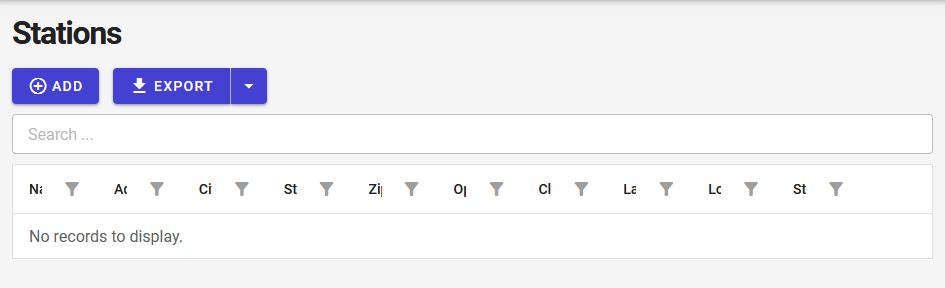
I used the same Name property for both Station and Kiosk entities. Station page opens fine but kiosk doesn't.

However, I don't understand why it gives this error, it is clearly a string, and the query is trying to parse it as enum, how?

ParseException: Enum type 'i.Name' not found
System.Linq.Dynamic.Core.Parser.ExpressionParser.ParseAsEnum(string id)

Even when I reduce the query to just name, it still gives the error

kiosks = await AppDbService.GetKiosks(
                new Query { Filter = $@"i.Name.Contains(@0)", 
                    FilterParameters = new object[] { search } });

Station Page:

Kiosk Page:

Hi, are there any news to this? Or even a solution? I am facing the same problem. I have this line generated by RADZEN:

var getArbeitsberichtesCustomResult = await EEvolution.GetArbeitsberichtes(new Query() { Filter = $@"i => (i.BEMERKUNGEN.Contains(@0) || i.Kunde.NAME1.Contains(@0) || i.Projekte.BEZEICHNUNG.Contains(@0) || i.Mitarbeiter.NAME1.Contains(@0)) && ({Globals.SelectedArbeitsberichteFilterString})", FilterParameters = new object[] { search }, OrderBy = $"Kunde.NAME1 ASC,DATUM asc" });

I receive the exception here in ApplyQuery:

items = items.Where(query.Filter, query.FilterParameters);

The Exception is called: Enum type NAME1 not found.

It comes from Kunde.NAME1, when I take it out, the exception does not occur.

When I change the code to this:

            var getArbeitsberichtesCustomResult = await EEvolution.GetArbeitsberichtes(new Query() { Filter = $@"i => (i.BEMERKUNGEN.Contains(@0) || i.Projekte.BEZEICHNUNG.Contains(@0) || i.Mitarbeiter.NAME1.Contains(@0)) && ({Globals.SelectedArbeitsberichteFilterString})", FilterParameters = new object[] { search }, OrderBy = "" });
            getArbeitsberichtesResult = getArbeitsberichtesCustomResult.Where(r => r.Kunde.NAME1.Contains(search)).OrderBy(o => o.Kunde.NAME1).ThenBy(o => o.DATUM);

then it works. The main problem is, that this happens at runtime and I cannot rely on generated code.

Of course Kunde.NAME1 exists.

Do you have any idea or even a better solution than rewriting generated code manually?

Best regards

Frank

Hi @FrankWuttke,

Please send us your database schema along with instructions what to scaffold at info@radzen.com.