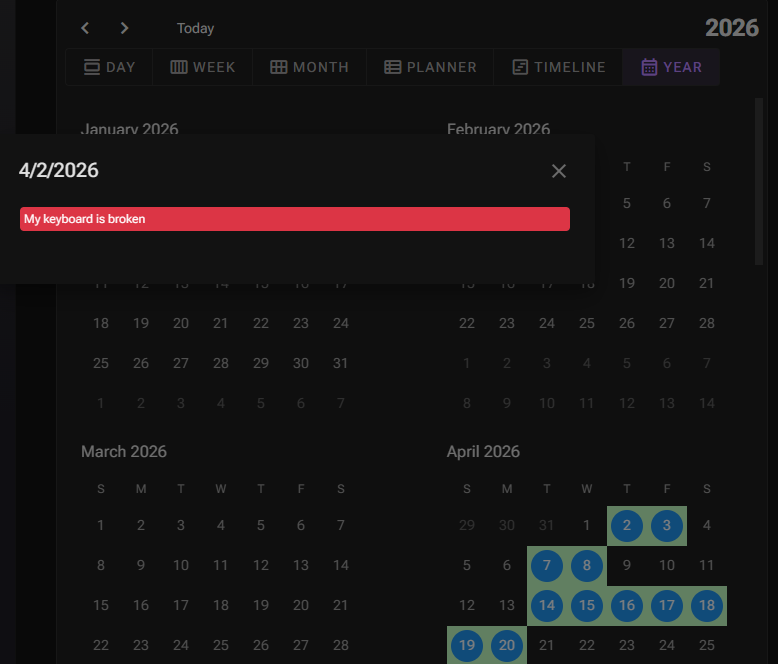
Is there a way to override/format the dialog displayed when selecting a slot while in year view on the scheduler.
async Task OnSlotSelect(SchedulerSlotSelectEventArgs args)
{
    if (args?.View?.Text != "Year")
    {

        await Task.CompletedTask;
    }
}
This code suggests that the year view has a built-in dialog, I want to override or change this popup modal.
Hi @Eduan-dev,
You can stop the default dialog from opening via:
args.PreventDefault();
You can then inject a DialogService and open a custom dialog with the desired content.
1 Like
Hi @korchev,
Thank you for the quick response.
I have the same question but for this ‘show other/more’ component:

Where can I override the default modal?
The scheduler does not have a callback for this event..?
The "+N more" dialog in the Month/YearPlanner/YearTimeline views is raised via a separate event — MoreSelect (not SlotSelect). You can stop the built-in dialog the same way:
  <RadzenScheduler Data="@appointments" MoreSelect="@OnMoreSelect" ... />

  @code {
      void OnMoreSelect(SchedulerMoreSelectEventArgs args)
      {
          args.PreventDefault();
          // open your own dialog via DialogService here using args.Start/args.End/args.Appointments
      }
  }
Note: the Year view doesn't use MoreSelect — clicking a day there always goes through SlotSelect (whether there are appointments or not), so for that view keep using SlotSelect +
args.PreventDefault() as in the earlier reply.
1 Like