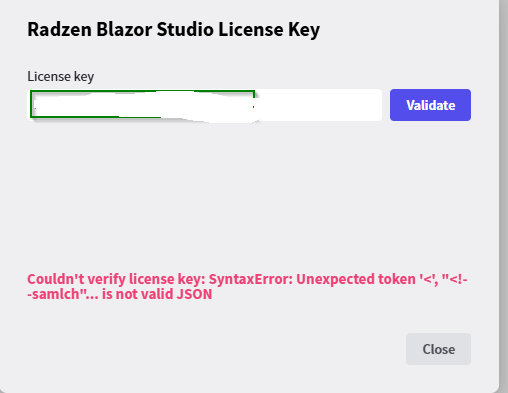
I get this error when I try to open Blazor Studio
Make sure you have access to internet and radzen.com.
It should be okay, unless it is a firewall thing. No problem reaching radzen.com
Thanks for the screenshot. The important part is the error text:
SyntaxError: Unexpected token '<', "<!--samlch"... is not valid JSON
Blazor Studio sends the license key to our server and expects a JSON reply. What it received instead is an HTML page starting with <!--samlch…, which is the beginning of a SAML sign-in challenge page. Such pages are produced by corporate secure web gateways and SSL-inspecting proxies that authenticate users through single sign-on (Zscaler, Netskope, Cisco Umbrella, GlobalProtect, Forcepoint and similar). In other words, the request never reached radzen.com. Your proxy intercepted it and answered with its own login page.
This also explains why radzen.com opens fine in your browser. The browser has already signed in to the proxy and carries its session cookie. Blazor Studio makes its own HTTP request without that cookie, so the proxy treats it as an unauthenticated client and returns the SAML page.
You can confirm this from a terminal, which behaves like Blazor Studio rather than like the browser:
Invoke-WebRequest https://www.radzen.com -UseBasicParsing | Select-Object -ExpandProperty Content | Select-Object -First 3
If the output starts with <!--samlch instead of the Radzen homepage, the proxy is intercepting non-browser traffic.
To resolve it, ask your IT department to whitelist radzen.com for Blazor Studio, or to exempt it from SAML authentication and SSL inspection. As a quick check you can also validate the key once from a network without the corporate proxy or with the VPN client disconnected.
I changed it to -First 15 as it showed the whole page. Result:
Blazor Components, Visual Designer & AI Agent Support | Radzen {
Can you try:
curl.exe -s -X POST -H "Content-Type: application/x-www-form-urlencoded" --data "product_permalink=test&license_key=test" https://app.radzen.com/v2/licenses/verify
If you get HTML starting with <!--samlch instead, your proxy is intercepting requests to app.radzen.com and that is what Blazor Studio runs into. Ask your IT department to allow app.radzen.com (or exempt it from SAML authentication and SSL inspection).
I get json in return
{"success":false,"message":"License key not found"}
Good, so a plain request to app.radzen.com goes through. That leaves two differences between curl.exe and Blazor Studio, and the SAML page must come from one of them:
- System proxy. Blazor Studio is an Electron app and uses the Windows proxy settings, including a PAC script if one is configured.
curl.exeignores them and goes straight out. If your network has a proxy, Blazor Studio's request is going through it andcurlwas not. - Browser user agent. SAML gateways only challenge clients that look like a browser, since only a browser can complete the sign-in. Electron identifies as Chrome;
curldoes not.
Two checks, both in PowerShell:
[System.Net.WebRequest]::GetSystemWebProxy().GetProxy("https://app.radzen.com/").AbsoluteUri
If this prints https://app.radzen.com/ there is no proxy configured for that host. If it prints a different address, that is the proxy Blazor Studio goes through, and this request should reproduce the problem because it uses the same proxy settings:
try { (Invoke-WebRequest https://app.radzen.com/v2/licenses/verify -Method Post -ContentType "application/x-www-form-urlencoded" -Body "product_permalink=test&license_key=test" -UseBasicParsing).Content } catch { $r = $_.Exception.Response; if ($r) { (New-Object IO.StreamReader($r.GetResponseStream())).ReadToEnd() } else { $_.Exception.Message } }
And the same request with a Chrome user agent:
curl.exe -s -A "Mozilla/5.0 (Windows NT 10.0; Win64; x64) AppleWebKit/537.36 (KHTML, like Gecko) Chrome/130.0.0.0 Safari/537.36" -X POST -H "Content-Type: application/x-www-form-urlencoded" --data "product_permalink=test&license_key=test" https://app.radzen.com/v2/licenses/verify
Whichever of these returns <!--samlch… instead of the JSON tells us where the interception happens. In both cases the fix is on the network side: IT needs to exempt app.radzen.com from SAML authentication for non-browser clients, or allow Blazor Studio to bypass the proxy for that host. The key only has to be validated once, so doing it from a network without the proxy (home network, phone hotspot) also works.
Okay, the first one returned an IP address:http://185.46.212.88/ The others Json: {"success":false,"message":"License key not found"}
Still I will contact our IT department. Just to be sure...
Strange. It works now?? Suddenly I could download the latest update and install it without any problems. Nothing is changed at my end 
Glad it works. The update is most likely a coincidence: nothing changed in the license validation or in how Blazor Studio reaches the network between the two versions.
What fits all your observations is the proxy at 185.46.212.88. Gateways that authenticate through SAML remember a signed-in user by machine or IP address for a while. When that session expires, the next request from a client that is not a browser, such as Blazor Studio, gets the SAML sign-in page, which is what the first screenshot showed. Once you sign in again from a browser (opening any site through the proxy is enough, often it happens silently), the gateway associates your machine with you again and lets Blazor Studio's requests through. By the time you ran the tests the session had already been refreshed, so the request through the proxy also returned JSON.
If the error comes back, open a page in your browser first and then validate the key again. Asking IT to exempt app.radzen.com from SAML authentication will make it go away for good.