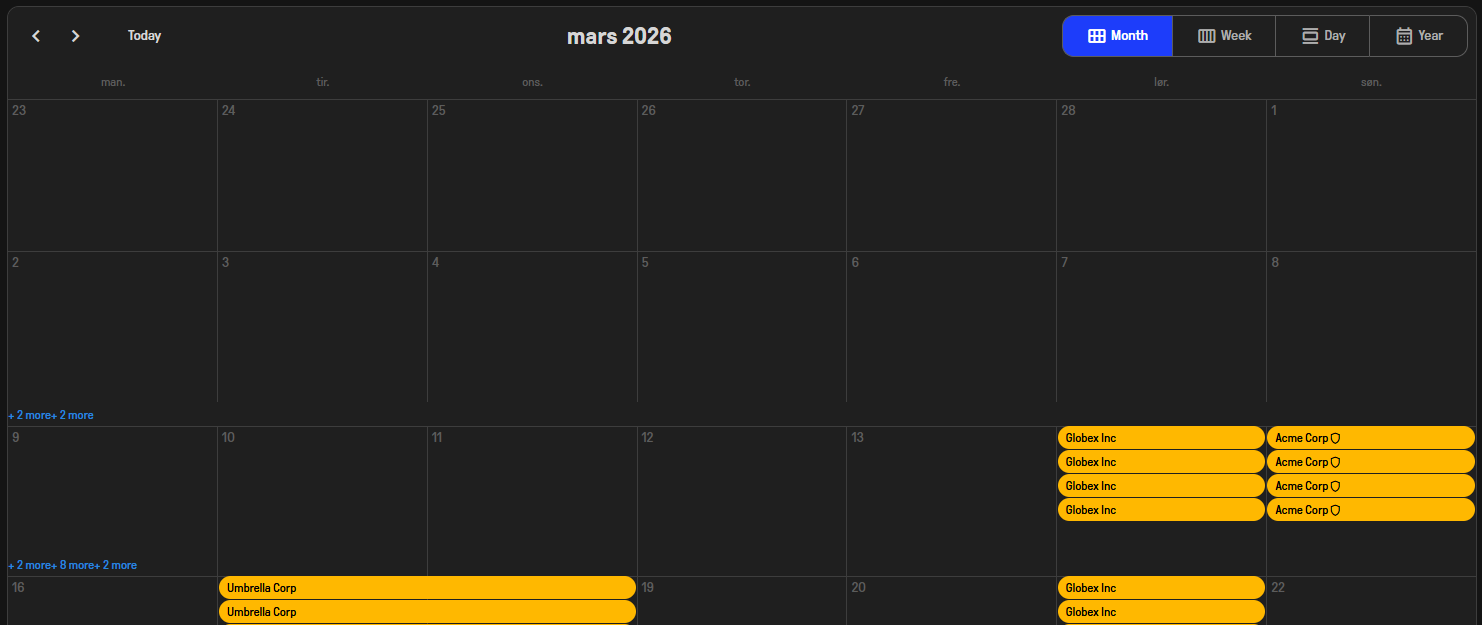
The +x more elements are wrongly aligned at the top left.
.rz-month-view .rz-event-list-btn {
position: static;
margin-inline-start:auto;font-size: var(--rz-scheduler-event-list-button-font-size)
}
Removing position: static; fixes the issue.
The +x more elements are wrongly aligned at the top left.
.rz-month-view .rz-event-list-btn {
position: static;
margin-inline-start:auto;font-size: var(--rz-scheduler-event-list-button-font-size)
}
Removing position: static; fixes the issue.
Hi @LostLogic,
Something is out of sync as everything works as expected online. Either the premium theme is older than v10 or you are using a newer premium them with the older Radzen.Blazor package.
From Radzen studio:
Fluent3-dark:
material3-dark:
I’m not getting any notification to update theme. Deleted the css files from wwwroot\css that’s related to material3 and fluent - but it did not make any difference. I have no overrides that affect this in the site.css file. Attached are the theme css files that Studio put in the css folder.
themes.zip (299.6 KB)
Studio is on the latest version
Here is the RadzenScheduler markup I use:
<RadzenScheduler TItem="CalendarAppointment"
                 Data="@FilteredCalendarAppointments"
                 StartProperty="Start"
                 EndProperty="End"
                 TextProperty="Text"
                 LoadData="@OnLoadData"
                 SlotSelect="@OnSlotSelect"
				 SlotRender="@OnSlotRender"
                 AppointmentSelect="@OnAppointmentSelect"
                 AppointmentRender="@OnAppointmentRender"
				 style="height: 1000px; --rz-scheduler-event-list-button-color: var(--rz-info)"
				 AppointmentMouseEnter=@OnAppointmentMouseEnter
				 AppointmentMouseLeave=@OnAppointmentMouseLeave
				 ShowHeader="true">
	<ChildContent>
  <RadzenMonthView MaxAppointmentsInSlot="4" />
  <RadzenWeekView StartTime="@TimeSpan.FromHours(0)" />
		<RadzenDayView StartTime="@TimeSpan.FromHours(0)" />
		<RadzenYearView />
	</ChildContent>
	<Template Context="appt">
		@appt.Text
		@if (appt.Config.Secured)
		{
			<RadzenIcon Icon="shield" Style="font-size:0.85rem; vertical-align:middle;" title="Secured" />
		}
	</Template>
</RadzenScheduler>
All themes seem to work fine in the online demo. Can you reproduce the issue there? If not then I am positive your themes are out of date. Try changing the theme to a different one and back. Also are non-premium themes working for you?
Ah. I’m sorry. I didn’t realize the library of Radzen needed an update too.
Following an update of the library and a rebuild it looks correct. Sorry for the trouble.
It would be nice if the theme update notification in Studio and VS would remind us that the library needs an update as well. The “Premium Theme updated” is nice, but we’d both saved a bit of time if we either had an “Library is out of date” or “Library updated” message.
Thank you for your assistance korchev. Feel free to close this thread.