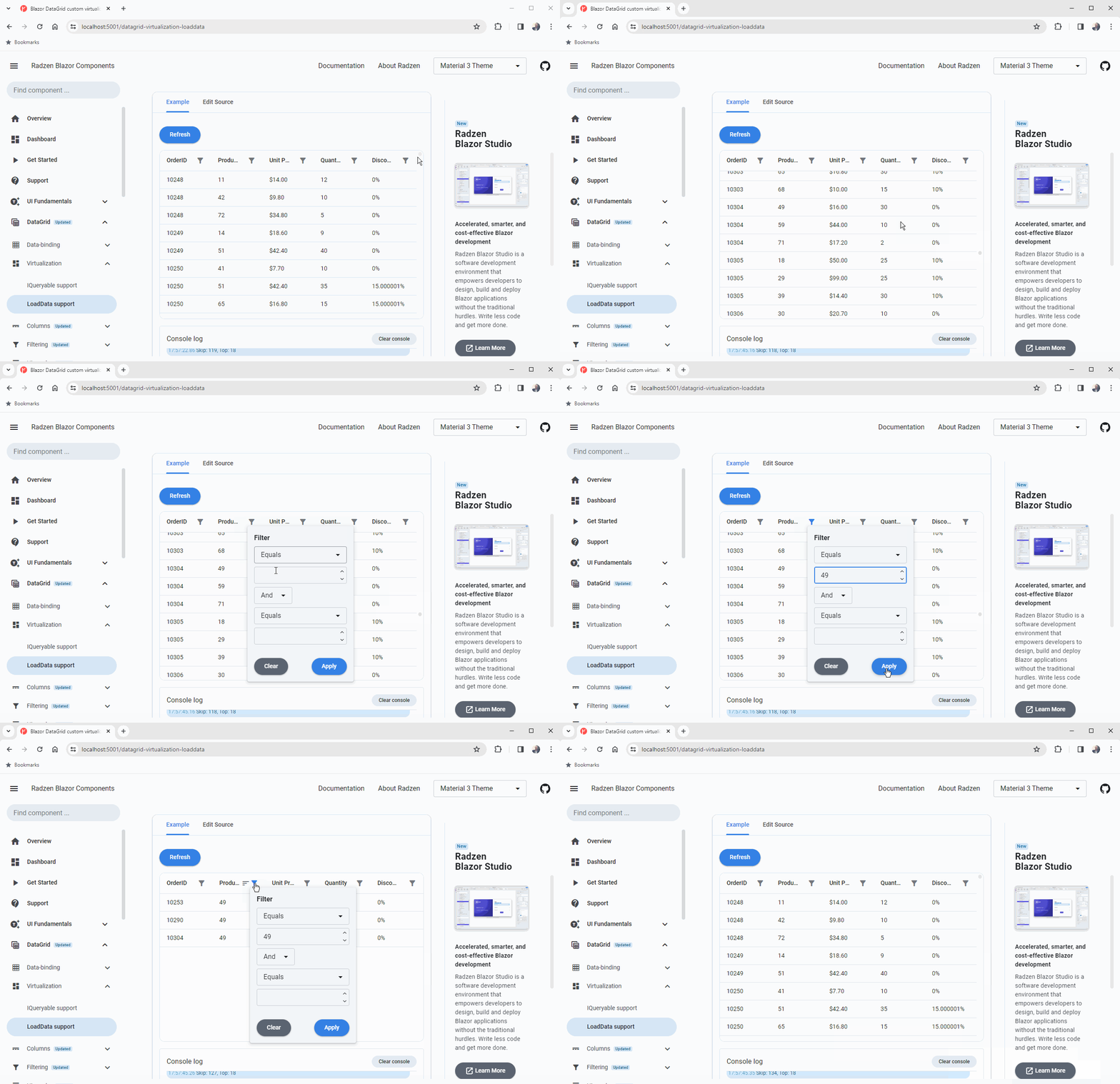
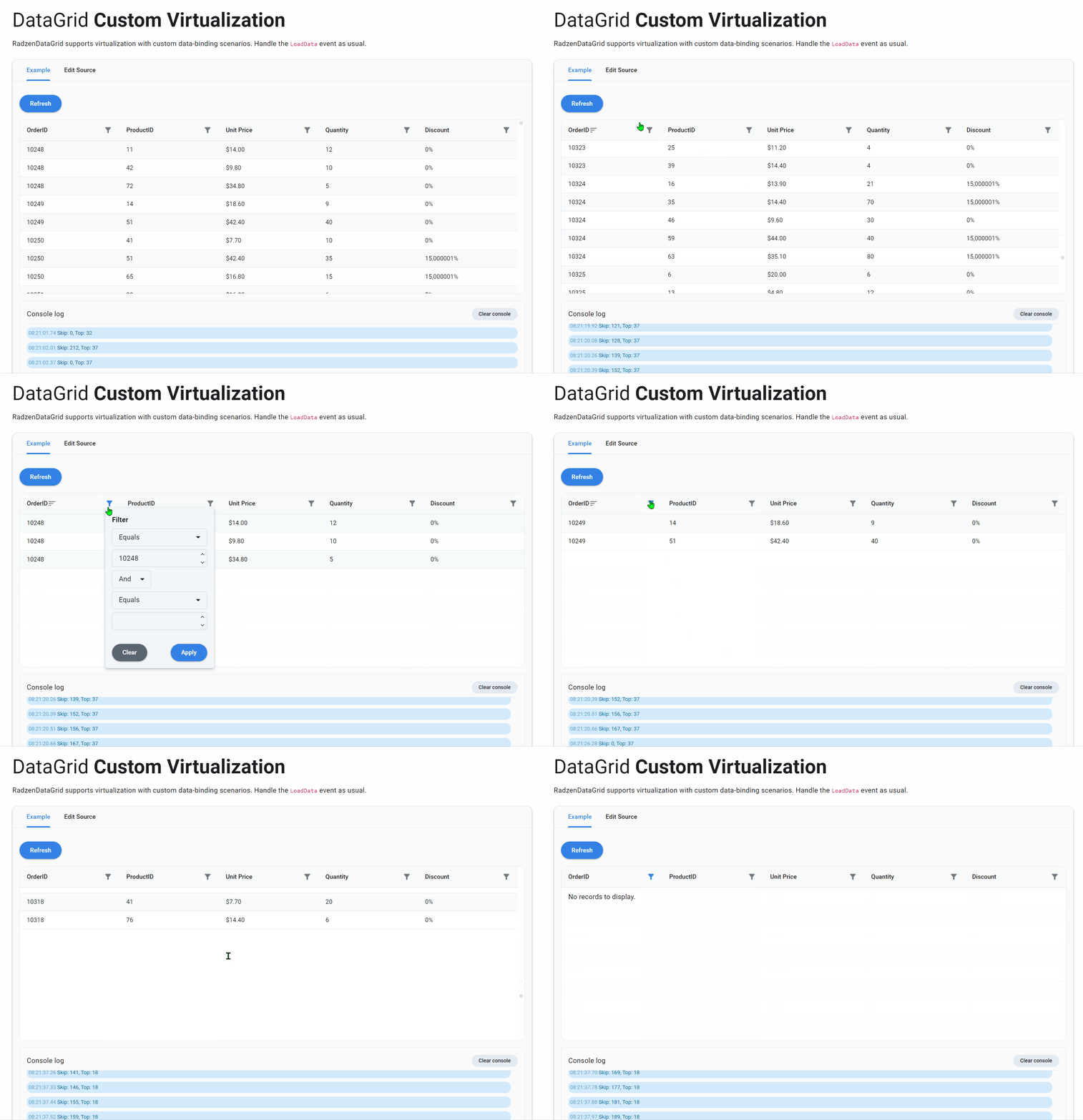
When I scroll the virtualized grid, far enough, and I apply a filter from a column filter, the datagrid is not reset properly and i can't see the results.
You can use the code at the bottom of the page with this address Blazor DataGrid custom virtualization
Scenario 1 : Scroll to the middle of the virtual grid, then apply filter on OrderID with 10249. It displays "No records to display"
Scenario 2 : Reset the page, scroll to middle of virtual grid, use search box to filter with 10249. Filtering succeeded because OnSearchAsync use grid.Reload()
Question : is it possible to reset the grid after applying template for column? How to reset the grid if I use grid.RefreshDataAsync() instead of reload?
Thank you for your help.
@using System.Linq.Dynamic.Core
@using RadzenBlazorDemos.Data
@using RadzenBlazorDemos.Models.Northwind
@using Microsoft.EntityFrameworkCore

@inherits DbContextPage

<RadzenButton Text="Refresh" Click="@(args => grid.Reload())" class="my-3" />
<br />
Search<RadzenTextBox Text="Search" ValueChanged="OnSearchAsync" />

<RadzenDataGrid @ref=grid
    Data="@orderDetails"
    Count="@count"
    LoadData="@LoadData"
    TItem="OrderDetail"
    AllowVirtualization="true"
    Style="height:400px"
    AllowFiltering="true"
    FilterPopupRenderMode="PopupRenderMode.OnDemand"
    FilterCaseSensitivity="FilterCaseSensitivity.CaseInsensitive"
    LogicalFilterOperator="LogicalFilterOperator.Or"
    AllowSorting="true">

    <Columns>
        <RadzenDataGridColumn TItem="OrderDetail" Property="OrderID" Title="OrderID" />
        <RadzenDataGridColumn TItem="OrderDetail" Property="ProductID" Title="ProductID" />
        <RadzenDataGridColumn TItem="OrderDetail" Property="UnitPrice" Title="Unit Price">
            <Template Context="detail">
                @String.Format(new System.Globalization.CultureInfo("en-US"), "{0:C}", detail.UnitPrice)
            </Template>
        </RadzenDataGridColumn>
        <RadzenDataGridColumn TItem="OrderDetail" Property="Quantity" Title="Quantity" />
        <RadzenDataGridColumn TItem="OrderDetail" Property="Discount" Title="Discount">
            <Template Context="detail">
                @String.Format("{0}%", detail.Discount * 100)
            </Template>
        </RadzenDataGridColumn>
    </Columns>
</RadzenDataGrid>

<EventConsole @ref=@console />
@code {
    EventConsole console;
    RadzenDataGrid<OrderDetail> grid;
    int count;
    IEnumerable<OrderDetail> orderDetails;
    private string? _searchText;

	private async Task OnSearchAsync(string search)
	{
		_searchText = string.IsNullOrWhiteSpace(search) || grid is null
			? null
			: search;

        console.Log("OnSearch");
		await grid!.Reload();
        <!-- await grid!.RefreshDataAsync(); -->
	}


    void LoadData(LoadDataArgs args)
    {
        console.Log($"Skip: {args.Skip}, Top: {args.Top}");

        var query = dbContext.OrderDetails.AsQueryable();

        if (!string.IsNullOrEmpty(args.Filter))
        {
            console.Log($"{args.Filter}");
            query = query.Where(args.Filter);
        }
        if (!string.IsNullOrEmpty(_searchText))
        {
            console.Log($"Search : {_searchText}");
            query = query.Where("OrderID == 10248");
        }
        if (!string.IsNullOrEmpty(args.Filter) || !string.IsNullOrEmpty(_searchText))
        {
            console.Log("Query.Count()");
            count = query.Count();
        }
        else
        {
            count = dbContext.OrderDetails.Count();
        }

        if (!string.IsNullOrEmpty(args.OrderBy))
        {
            query = query.OrderBy(args.OrderBy);
        }

        // Add more rows
        var t = Enumerable.Concat(query.ToList(), query.ToList()).ToList();
        t = Enumerable.Concat(t, query.ToList()).ToList();

        var myCount = t.Count();
        console.Log($"{myCount}");


        orderDetails = t.Skip(args.Skip.Value).Take(args.Top.Value).ToList();
    }
}