Hello Radzen team,I’m using a RadzenDataGrid with AllowPaging="false" and a separate RadzenPager component, instead of the built-in pager (AllowPaging="true").
The reason is that I want to place some buttons and text between the DataGrid and the Pager.
However, I’ve encountered one issue.
When I set FilterMode="FilterMode.CheckBoxList" on the RadzenDataGrid, the filter popup only shows the data that is currently displayed on the page.
I understand that this happens because the Data property of the DataGrid is bound to the paged data.
But as far as I know, that’s required in order to synchronize the RadzenDataGrid with the external RadzenPager.
Is there any way to solve this issue?
Or am I using the components incorrectly?
Any advice would be appreciated.
Thank you for your response.
I was able to load all the data.
I’m sorry for the additional question.
Even though all the data is loaded, only 16 items are displayed in the list (there are 22 items in total).
If I enter a keyword that is not displayed at the top of the list, filtering works and the item appears, so it seems the list actually contains all the data.
Also, when I checked in debugging, the LoadColumnFilterData event is triggered multiple times, for example by mouse scrolling.
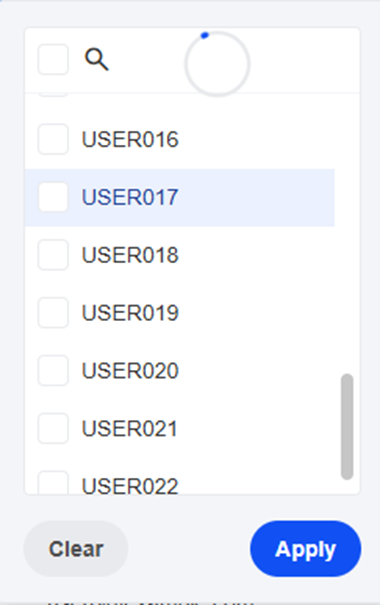
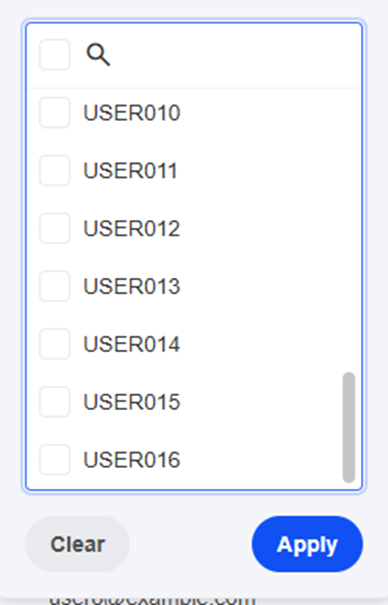
The first time, the 22nd item (see Image ①) is displayed, but on the second execution, only 16 items (see Image ②) are shown.
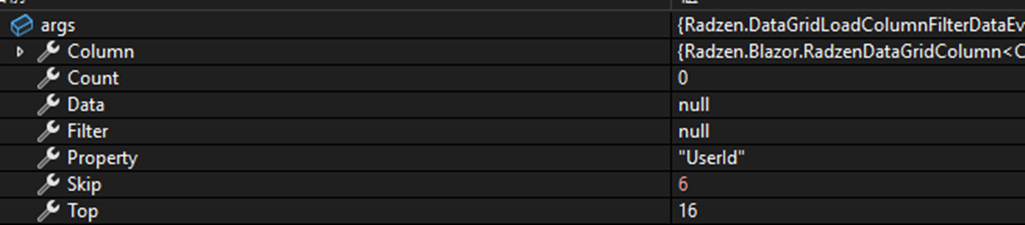
I confirmed that args.Count is set to 22 and the data assigned to args.Data also contains all 22 items (see Image ③).
I would greatly appreciate any advice you could provide.
Thank you very much in advance.
Thank you very much! The issue has been resolved.
Thanks to your help, I can fully enjoy my holiday!!
I’m sorry for asking another question.
For rows where an int column is displayed as a string using a RadzenDataGridColumn Template Context, the filter list is still generated as integers.
If there is a way to make the filter use a list of strings instead so that filtering works on the displayed text, I would greatly appreciate it if you could let me know.