Is there a feature with the dropdown that allows for custom text entry outside of the bound data? Example: Say you have a DD for salutations (ie. Mr, Mrs, Ms, etc). You generate this list based on a distinct selection of a SQL column. However, a user comes and wants to use “Dr.” for a salutation but is not present. I would like the user to be able to enter this and bind to the value of the DD. Then the next time someone comes into the application, Dr. is present in the list because someone prior added it.
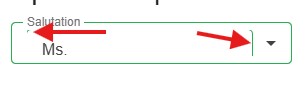
Here is what I am currently doing, but when an existing entry is selected, it looks funny.
<RadzenFormField Text="Salutation">
    <RadzenDropDown @bind-Value=ViewModel.Entry.Salutation Data=ViewModel.Salutations ShowValueTemplateOnEmpty="true" Name="DropDownEdit">
        <ValueTemplate Context="data">
            <RadzenTextBox @bind-Value=ViewModel.Entry.Salutation aria-labelledby="DropDownEditLabel" />
        </ValueTemplate>
    </RadzenDropDown>
</RadzenFormField>