i am trying to put a grid on the page that takes up whatever space is available horizontally, but scrolls left to right if it doesn't. i copied a grid from your site that does this but when i include it, i either have to set the width to one amount (i.e. 700px) or let it go off the right hand side of the screen. the example i tried to follow is here.
As i adjust the width of the browser, the grid adjusts to fill whatever container it is in. if i copy that grid to my page, it pushes the right hand side out and makes the browser itself display a horizontal scroll bar.
The Grid i declared is this way.
<RadzenDataGrid AllowFiltering="true" AllowColumnResize="true" AllowAlternatingRows="false" FilterMode="FilterMode.Advanced" AllowSorting="true" PageSize="5" AllowPaging="true" PagerHorizontalAlign="HorizontalAlign.Left" ShowPagingSummary="true"
                Data="@employees" ColumnWidth="300px" LogicalFilterOperator="LogicalFilterOperator.Or" SelectionMode="DataGridSelectionMode.Single">
    <Columns>
        <RadzenDataGridColumn Property="@nameof(Employee.FirstName)" Filterable="false" Title="ID" Frozen="true" Width="5rem" TextAlign="TextAlign.Center" />
        <RadzenDataGridColumn Property="@nameof(Employee.FirstName)" Title="First Name" Frozen="true">
            <FooterTemplate>
                Total employees: <b>@employees.Count()</b>
            </FooterTemplate>
        </RadzenDataGridColumn>
        <RadzenDataGridColumn Property="@nameof(Employee.FirstName)" Title="Last Name">
            <FooterTemplate>
                Footer
            </FooterTemplate>
        </RadzenDataGridColumn>
        <RadzenDataGridColumn Property="@nameof(Employee.FirstName)" Title="Title" Width="200px" />
        <RadzenDataGridColumn Property="@nameof(Employee.FirstName)" Title="Birth Date" FormatString="{0:d}" />
        <RadzenDataGridColumn Property="@nameof(Employee.FirstName)" Title="Hire Date" FormatString="{0:d}" />
        <RadzenDataGridColumn Property="@nameof(Employee.FirstName)" Title="Address" />
        <RadzenDataGridColumn Property="@nameof(Employee.FirstName)" Title="City" />
        <RadzenDataGridColumn Property="@nameof(Employee.FirstName)" Title="Region" />
        <RadzenDataGridColumn Property="@nameof(Employee.FirstName)" Title="Postal Code" />
        <RadzenDataGridColumn Property="@nameof(Employee.FirstName)" Title="Country" />
        <RadzenDataGridColumn Property="@nameof(Employee.FirstName)" Title="Home Phone" />
        <RadzenDataGridColumn Property="@nameof(Employee.FirstName)" Title="Extension" />
        <RadzenDataGridColumn Property="@nameof(Employee.FirstName)" Title="Notes" />
    </Columns>
</RadzenDataGrid>
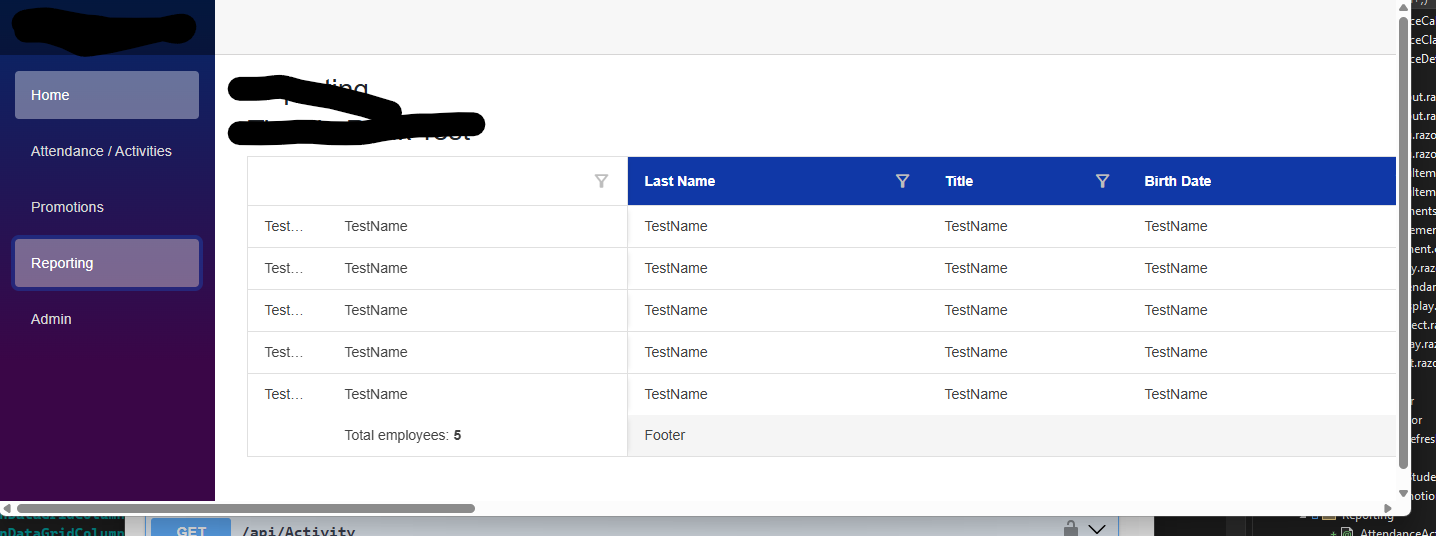
I am beginning to think you have your grid in some other kind of container which is causing it to behave but it is not in the code sample. how do i get my grid to behave the way your's is.