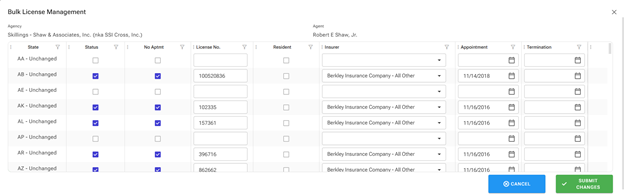
I’m trying to conditionally format each row of the DataGrid depending on the values on the row.
I followed the example, but it did not work when the row is in “edit” mode.
Is there a way to conditionally format a row that is in edit mode?
I’m trying to conditionally format each row of the DataGrid depending on the values on the row.
I followed the example, but it did not work when the row is in “edit” mode.
Is there a way to conditionally format a row that is in edit mode?
The RowRender and CellRender callbacks do work in edit mode — they fire for every row/cell render regardless of whether the row is being edited. The conditional formatting itself is not lost; however, a common pitfall is that CSS specificity from the edit-mode class (rz-datatable-edit) or inline editor styles can override your custom styles.
Here's how to apply conditional formatting that works in both display and edit modes:
<RadzenDataGrid Data="@orders" TItem="Order" RowRender="@OnRowRender">
    ...
</RadzenDataGrid>

@code {
    void OnRowRender(RowRenderEventArgs<Order> args)
    {
        // This fires for ALL rows, including rows in edit mode
        if (args.Data.Total > 1000)
        {
            args.Attributes.Add("style", "background-color: var(--rz-danger-lighter);");
        }
    }
}
<RadzenDataGridColumn Property="Total" CellRender="@OnCellRender" />

@code {
    void OnCellRender(DataGridCellRenderEventArgs<Order> args)
    {
        if (args.Data.Total > 1000)
        {
            args.Attributes.Add("style", "color: red; font-weight: bold;");
        }
    }
}
Below you will find snippets of my code detailing how I assign the “Style” in RowRender.
Code:
<RadzenDataGrid TItem="AgencyLicenseBulk" Data="@Licenses"
                ColumnWidth="125px"  @ref="@Grid"
                Style="border-radius: 10px; max-height: 400px;
                height: 400px" EmptyText="No records to display"
                AllowColumnReorder="true"
                GridLines="DataGridGridLines.Vertical"
                AllowSorting="true" Density="Density.Compact"
                SelectionMode="DataGridSelectionMode.Multiple"
                AllowFiltering="true"
                FilterMode="FilterMode.Advanced"
                AllowColumnResize="true"
                EditMode="DataGridEditMode.Multiple"
                IsLoading="@IsLoading" Page="@ShowLoading"
                RowRender="@RowRender">
private void RowRender(RowRenderEventArgs<AgencyLicenseBulk> args)
{
var colorProperty = args.Data?.Original ?? false
? args.Data?.Changed ?? false
? "background-color: var(--rz-success-lighter)"
: "background-color: var(--rz-success-light)"
: args.Data?.Changed ?? false
? "background-color: var(--rz-info-lighter)"
: "";
if (args.Attributes.Any(a=> a.Key == "Style"))
args.Attributes["Style"] = colorProperty;
else
args.Attributes.Add("Style", colorProperty);
Console.WriteLine($"State: {args.Data?.StateCode}");
Console.WriteLine($"Color inp: {colorProperty}");
Console.WriteLine($"Color att: {args.Attributes["Style"]}");
}
Console output:
State: AA
Color inp:
Color att:
State: AB
Color inp: background-color: var(--rz-success-light)
Color att: background-color: var(--rz-success-light)
State: AE
Color inp:
Color att:
State: AK
Color inp: background-color: var(--rz-success-light)
Color att: background-color: var(--rz-success-light)
State: AL
Color inp: background-color: var(--rz-success-light)
Color att: background-color: var(--rz-success-light)
State: AP
Color inp:
Color att:
State: AR
Color inp: background-color: var(--rz-success-light)
Color att: background-color: var(--rz-success-light)
State: AZ
Color inp: background-color: var(--rz-success-light)
Color att: background-color: var(--rz-success-light)
App output:
Any ideas?
It seems that is not the same “Style” than “style”. With everything in lowercase it works