Hi,
Thought I’d test this out. I was able to install successfully via
dotnet tool install --global Radzen.Mcp
Running the `radzen.mcp` command gave me an error as it was trying to read my current project’s appsettings.json.
radzen.mcp
radzen.mcp : Unhandled exception. System.IO.InvalidDataException: Failed to load configuration from file 'C:\ProjectFolder\appsettings.json'.
At line:1 char:1
+ radzen.mcp
+ ~~~~~~~~~~
    + CategoryInfo          : NotSpecified: (Unhandled excep...settings.json'.:String) [], RemoteException
    + FullyQualifiedErrorId : NativeCommandError

 ---> System.FormatException: Could not parse the JSON file.
 ---> System.Text.Json.JsonReaderException: The input does not contain any JSON tokens. Expected the input to start with a valid JSON token, when isFinalBlock is true. LineNumber: 0 | BytePositionInLine: 0.
   at System.Text.Json.ThrowHelper.ThrowJsonReaderException(Utf8JsonReader& json, ExceptionResource resource, Byte nextByte, ReadOnlySpan`1 bytes)
   at System.Text.Json.Utf8JsonReader.Read()
   at System.Text.Json.JsonDocument.Parse(ReadOnlySpan`1 utf8JsonSpan, JsonReaderOptions readerOptions, MetadataDb& database, StackRowStack& stack)
   at System.Text.Json.JsonDocument.Parse(ReadOnlyMemory`1 utf8Json, JsonReaderOptions readerOptions, Byte[] extraRentedArrayPoolBytes, PooledByteBufferWriter extraPooledByteBufferWriter)
   at System.Text.Json.JsonDocument.Parse(ReadOnlyMemory`1 json, JsonDocumentOptions options)
   at System.Text.Json.JsonDocument.Parse(String json, JsonDocumentOptions options)
   at Microsoft.Extensions.Configuration.Json.JsonConfigurationFileParser.ParseStream(Stream input)
   at Microsoft.Extensions.Configuration.Json.JsonConfigurationFileParser.Parse(Stream input)
   at Microsoft.Extensions.Configuration.Json.JsonConfigurationProvider.Load(Stream stream)
   --- End of inner exception stack trace ---
   at Microsoft.Extensions.Configuration.Json.JsonConfigurationProvider.Load(Stream stream)
   at Microsoft.Extensions.Configuration.FileConfigurationProvider.Load(Boolean reload)
   --- End of inner exception stack trace ---
   at Microsoft.Extensions.Configuration.FileConfigurationProvider.HandleException(ExceptionDispatchInfo info)
   at Microsoft.Extensions.Configuration.FileConfigurationProvider.Load(Boolean reload)
   at Microsoft.Extensions.Configuration.FileConfigurationProvider.Load()
   at Microsoft.Extensions.Configuration.ConfigurationManager.AddSource(IConfigurationSource source)
   at Microsoft.Extensions.Configuration.ConfigurationManager.ConfigurationSources.Add(IConfigurationSource source)
   at Microsoft.Extensions.Configuration.ConfigurationManager.Microsoft.Extensions.Configuration.IConfigurationBuilder.Add(IConfigurationSource source)
   at Microsoft.Extensions.Configuration.ConfigurationExtensions.Add[TSource](IConfigurationBuilder builder, Action`1 configureSource)
   at Microsoft.Extensions.Configuration.JsonConfigurationExtensions.AddJsonFile(IConfigurationBuilder builder, Action`1 configureSource)
   at Microsoft.Extensions.Configuration.JsonConfigurationExtensions.AddJsonFile(IConfigurationBuilder builder, IFileProvider provider, String path, Boolean optional, Boolean reloadOnChange)
   at Microsoft.Extensions.Configuration.JsonConfigurationExtensions.AddJsonFile(IConfigurationBuilder builder, String path, Boolean optional, Boolean reloadOnChange)
   at Microsoft.Extensions.Hosting.HostingHostBuilderExtensions.ApplyDefaultAppConfiguration(HostBuilderContext hostingContext, IConfigurationBuilder appConfigBuilder, String[] args)
   at Microsoft.Extensions.Hosting.HostApplicationBuilder..ctor(HostApplicationBuilderSettings settings)
   at Microsoft.Extensions.Hosting.HostApplicationBuilder..ctor(String[] args)
   at Microsoft.Extensions.Hosting.Host.CreateApplicationBuilder(String[] args)
   at Program.<Main>$(String[] args) in /home/runner/work/radzen-mcp/radzen-mcp/Radzen.Mcp/Program.cs:line 26
   at Program.<Main>(String[] args)
PM>
I ran it from an empty directory and got a server process running - which I closed afterwards as well.
rmcp radzen.mcp
info: ModelContextProtocol.Server.StdioServerTransport[857250842]
Server (stream) (Radzen.Mcp) transport reading messages.
info: Microsoft.Hosting.Lifetime[0]
Application started. Press Ctrl+C to shut down.
info: Microsoft.Hosting.Lifetime[0]
Hosting environment: Production
info: Microsoft.Hosting.Lifetime[0]
Content root path: C:\Users\me\rmcp
info: ModelContextProtocol.Server.StdioServerTransport[1221292038]
Server (stream) (Radzen.Mcp) transport completed reading messages.
info: Microsoft.Hosting.Lifetime[0]
Application is shutting down...
info: ModelContextProtocol.Server.McpServer[2081236114]
Server (Radzen.Mcp 0.0.3.0) shutting down.
info: ModelContextProtocol.Server.McpServer[613617602]
Server (Radzen.Mcp 0.0.3.0) shut down.
info: ModelContextProtocol.Server.StdioServerTransport[1375634372]
Server (stream) (Radzen.Mcp) shutting down.
info: ModelContextProtocol.Server.StdioServerTransport[1256455528]
Server (stream) (Radzen.Mcp) shut down.
I added the .mcp.json to VS 2026 Insiders in my solution. I restarted VS..
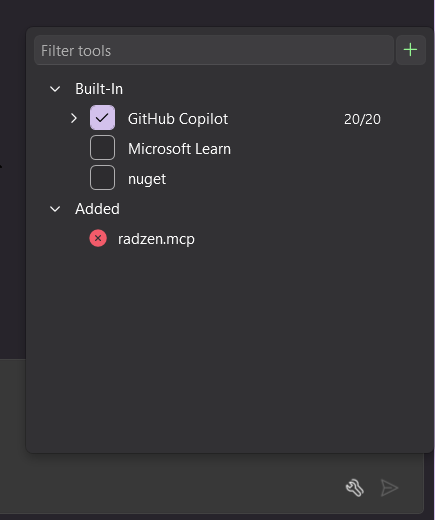
I clicked the spanners button in CoPilot tab - I clicked to check Radzen MCP and get a red X.
If I click the “…“ I can see the mcp.json file - if I hit configure. I see the failed message.
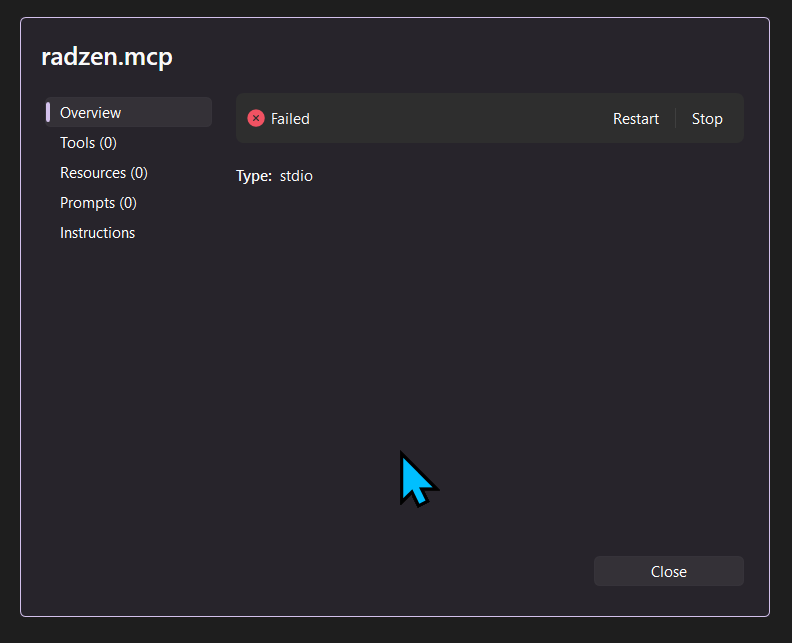
Click Restart shows starting for a few seconds, then Failed.
I tried hitting Restart with it running in the other Terminal prompt. Same error..
So, not sure what else to do?

