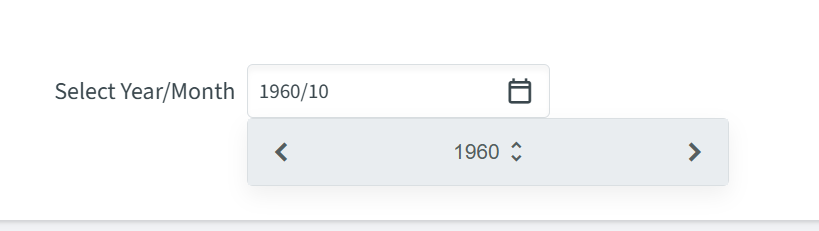
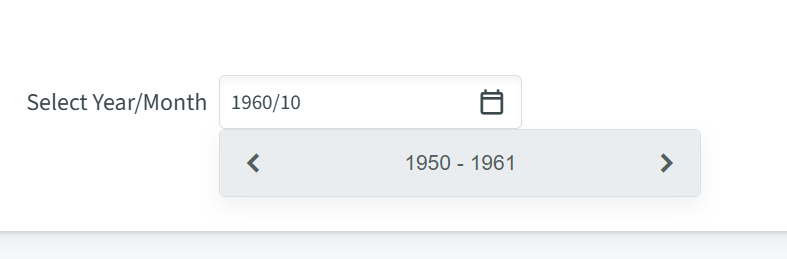
After upgrading to Radzen 12, the Month/Year picker UI has become difficult to use due to changes in the navigation behavior. The new calendar navigation causes users to get stuck in the year‑range view, with no way to return to the normal month selection view without closing and reopening the picker.
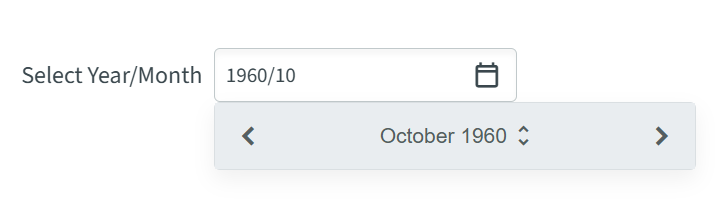
Level 1 — Month view
-
Left/Right arrows → change month
-
Up arrow → switch to Year view
-
Down arrow → switch to Year view
-
Center title click → switch to Year view
Level 2 — Year view
-
Left/Right arrows → change year
-
Up arrow → switch to Year‑Range view
-
Down arrow → switch to Year‑Range view
-
Center title click → switch to Year‑Range view
Level 3 — Year‑Range view
This is where the problem happens:
-
Left/Right arrows → move between ranges (e.g., 2020–2031 → 2032–2043)
-
There is NO way to go back to Month view
-
Up/Down arrows do nothing useful
-
Clicking center title does nothing
-
You are stuck until you close the popup and reopen
-