# HTML5 Content

**URL:** <https://forum.radzen.com/t/html5-content/21367>\
**Category:** Radzen Studio\
**Created:** [February 10, 2026, 1:59pm UTC](https://forum.radzen.com/t/html5-content/21367 "2026-02-10T13:59:24Z")\
**Posts on this page:** 7\
**Page:** 1

<div class="post-metadata">

**Author:** ![JUN](https://forum.radzen.com/letter_avatar_proxy/v4/letter/j/8e7dd6/32.png) [@JUN](https://forum.radzen.com/u/JUN)\
**Post date:** [February 10, 2026, 1:59pm UTC](https://forum.radzen.com/t/html5-content/21367/1 "2026-02-10T13:59:24Z")

</div>

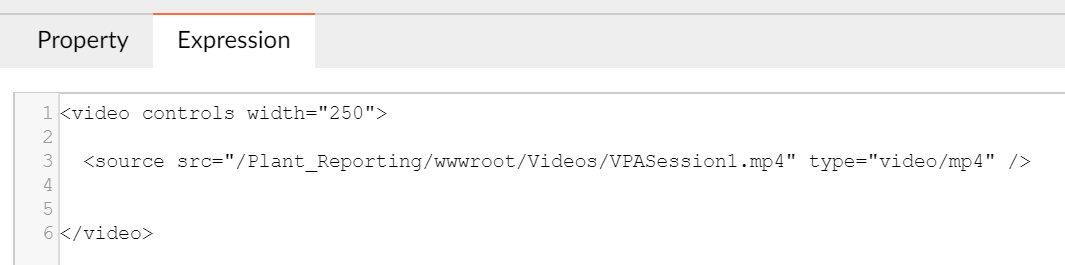
I am using Radzen 2.86.8 to build a Blazor app and I am trying display a video file using the HTML component. I have set the content to:

![image](https://forum.radzen.com/uploads/default/original/3X/2/8/28723675960fe3a03cea9b026c080a69ae076a9a.png)

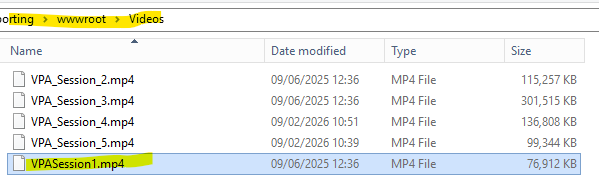
I have confirmed the location is correct. I when I run the application I get a 404 error that the file is not found. Can someone confirm I am using the HTML content property correctly?

Thank you!
 ![image](https://forum.radzen.com/uploads/default/original/3X/2/3/23ecc074e740e7c8e5bd0e33c4e55d1410028779.png)

---

<div class="post-metadata">

**Author:** ![korchev](https://forum.radzen.com/user_avatar/forum.radzen.com/korchev/32/4_2.png) [@korchev](https://forum.radzen.com/u/korchev)\
**Post date:** [February 10, 2026, 7:12pm UTC](https://forum.radzen.com/t/html5-content/21367/4 "2026-02-10T19:12:47Z")

</div>

The `/videos` path is rooted which could be incorrect. You can inspect the generated video element with the browser developer tools to see what the actual path is.

---

<div class="post-metadata">

**Author:** ![JUN](https://forum.radzen.com/letter_avatar_proxy/v4/letter/j/8e7dd6/32.png) [@JUN](https://forum.radzen.com/u/JUN)\
**Post date:** [February 12, 2026, 8:41pm UTC](https://forum.radzen.com/t/html5-content/21367/5 "2026-02-12T20:41:48Z")

</div>

Thank you for the quick response.

I have verified in the IIS configuration and also in the content.

When I execute “file:///K:/Plant\_Reporting/wwwroot/Videos/VPASession1.mp4” from a browser, the file works.  
When I execute “/Plant\_Reporting/wwwroot/Videos/VPASession1.mp4” from the application I get the 404 error. The application and file are on the server that I have mapped to my client as K:

The browser developer tools only reports:

![image](https://forum.radzen.com/uploads/default/original/3X/8/1/81c1939a341d57869892a282c879a0a0986840bf.png)

The HTML component expression is

 ![image](https://forum.radzen.com/uploads/default/original/3X/d/4/d4f97dbdab5271e33ce635179f429b62c643df4b.png)

---

<div class="post-metadata">

**Author:** ![korchev](https://forum.radzen.com/user_avatar/forum.radzen.com/korchev/32/4_2.png) [@korchev](https://forum.radzen.com/u/korchev)\
**Post date:** [February 12, 2026, 8:59pm UTC](https://forum.radzen.com/t/html5-content/21367/6 "2026-02-12T20:59:56Z")

</div>

I think the path is wrong. Usually wwwroot isn't part of the URL.

---

<div class="post-metadata">

**Author:** ![JUN](https://forum.radzen.com/letter_avatar_proxy/v4/letter/j/8e7dd6/32.png) [@JUN](https://forum.radzen.com/u/JUN)\
**Post date:** [February 12, 2026, 9:23pm UTC](https://forum.radzen.com/t/html5-content/21367/7 "2026-02-12T21:23:03Z")

</div>

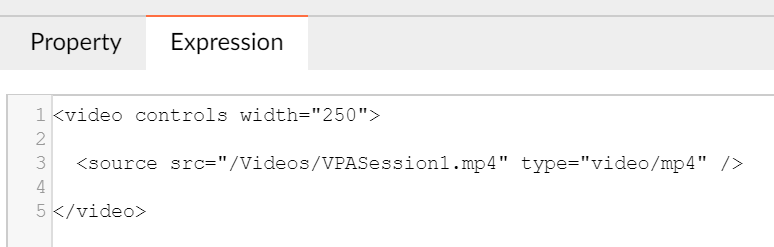
The errors are the same if I shorten the path to ![image](https://forum.radzen.com/uploads/default/original/3X/9/1/911c596440d25793fcfda0d3e0288b4e8705af49.png)

I am concerned that I dont have the correct syntax in the content of the HTML component. Should the component be using HTML video tags?
 ![image](https://forum.radzen.com/uploads/default/original/3X/7/2/7279007519d6fe0ee7557ab427efcaa172eda207.png)

---

<div class="post-metadata">

**Author:** ![JUN](https://forum.radzen.com/letter_avatar_proxy/v4/letter/j/8e7dd6/32.png) [@JUN](https://forum.radzen.com/u/JUN)\
**Post date:** [February 13, 2026, 1:27am UTC](https://forum.radzen.com/t/html5-content/21367/8 "2026-02-13T01:27:22Z")

</div>

I have solved the issue by changing the content to

 ![image](https://forum.radzen.com/uploads/default/original/3X/e/b/eb45a461d6020d0862ad8f30cec055ae23036377.png)

but when I try to pass the content by setting a property I get: error CS0103: The name 'Html0' does not exist in the current context’ when trying to use html0.Reload();

---

<div class="post-metadata">

**Author:** ![korchev](https://forum.radzen.com/user_avatar/forum.radzen.com/korchev/32/4_2.png) [@korchev](https://forum.radzen.com/u/korchev)\
**Post date:** [February 13, 2026, 5:20am UTC](https://forum.radzen.com/t/html5-content/21367/9 "2026-02-13T05:20:30Z")

</div>

I suggest using an expression for that:

```auto
<source src="${myProperty}" type="video/mp4" />

```

or

```auto
<source src="@(myProperty)" type="video/mp4" />

```

By the way we strongly recommend upgrading to Radzen Blazor Studio:

1. It supports code editing and doesn't need the Html component - you can type any Blazor markup
2. It supports up-to-date Blazor versions
3. We are actively releasing updates to it - new features, new components etc.