thanks, i have another doubt that maybe can be solved with a template too.... there is any option to achieve this
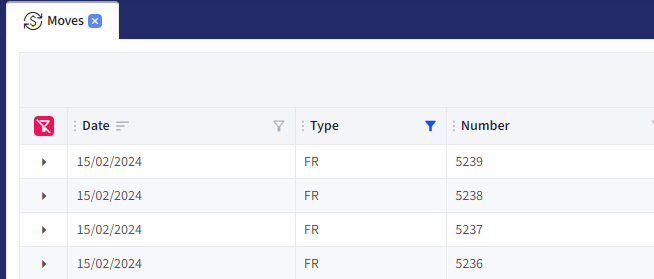
the red clear filter button using a Template?? i'm doing the same, moving the button with JS
<RadzenDataGrid @ref="_grid" @bind-Value="@_selectedMoves" @bind-Settings="@RadzenSettings" Data="@_elements" LoadData="@LoadData" Count="@count" Page=@(() => {}) TItem="CoMoveVM"
                AllowFiltering="@_gridSettings.AllowFiltering"
                AllowColumnResize="@_gridSettings.AllowColumnResize"
                AllowColumnReorder="@_gridSettings.AllowColumnReorder"
                AllowAlternatingRows="@_gridSettings.AllowAlternatingRows"
                AllowRowSelectOnRowClick="@_gridSettings.AllowRowSelectOnRowClick"
                AllowPaging="@_gridSettings.AllowPaging"
                PagerPosition="PagerPosition.Bottom"
                PageSize=@_gridSettings.PageSize
                PageSizeOptions="@_gridSettings.PageSizeOptions"
                ShowPagingSummary="@_gridSettings.ShowPagingSummary"
                PagingSummaryFormat="@_gridSettings.pagingSummaryFormat"
                AllowSorting="@_gridSettings.AllowSortings"
                FilterMode="@_gridSettings.FilterMode"
                SelectionMode="@_gridSettings.SelectionMode"
                LogicalFilterOperator="LogicalFilterOperator.And"
                ColumnReordered="OnColumnReordered"
                RowDoubleClick="OnRowDoubleClick"
                RowClick="OnRowClick"
                RowRender="OnRowRender"
                ColumnWidth="150px" class="@(_gridSettings.ShowExpand ? $"grid-full-height grid-{Id}":$"grid-medium-height grid-{Id}")"
                ExpandMode="DataGridExpandMode.Single">
    <HeaderTemplate>
        <RadzenStack Orientation="Orientation.Horizontal" AlignItems="AlignItems.Center" JustifyContent="JustifyContent.SpaceBetween" Style="width: 100%">
            <RadzenStack Orientation="Orientation.Horizontal" AlignItems="AlignItems.Center" JustifyContent="JustifyContent.Start" Gap="0.5rem;" Wrap="FlexWrap.Wrap">
                <RadzenButton id="@($"clear-grid-{Id}-filter")" Icon="filter_alt_off" ButtonStyle="ButtonStyle.Danger" Size="ButtonSize.ExtraSmall" MouseEnter="@(args => ShowTooltip(args,"Clear all filters"))" Click="ClearGridFilters" Visible="IsFilterApplied" />
                @{
                    _ = MoveClearGridFilterAsync(Id);
                }
            </RadzenStack>
            <RadzenStack Orientation="Orientation.Horizontal" AlignItems="AlignItems.Center" JustifyContent="JustifyContent.End" Gap="0.5rem;" Wrap="FlexWrap.Wrap" Style="width:max-content">
                <RadzenFormField Text="Search" Variant="Variant.Outlined">
                    <ChildContent>
                        <RadzenTextBox @ref="keywordTextBox" Name="Keyword" Placeholder="Keyword" AutoComplete="false" @oninput="searchTerm.OnNext" @onkeydown="(e => SubmitOnEnter(e))" />
                    </ChildContent>
                    <End>
                        <RadzenButton Icon="search" Variant="Variant.Text" Click="SearchOnGrid" />
                    </End>
                </RadzenFormField>
                <RadzenButton Icon="add_circle_outline" ButtonStyle="ButtonStyle.Success" Size="ButtonSize.Small" Click="@NewMove" />
                <RadzenButton Icon="filter_alt" ButtonStyle="ButtonStyle.Primary" Size="ButtonSize.Small" />
                <RadzenProfileMenu class="export-data p-0">
                    <Template>
                        <RadzenButton ButtonStyle="ButtonStyle.Secondary" Icon="export_notes" Size="ButtonSize.Small" class="pr-3" />
                    </Template>
                    <ChildContent>
                        <RadzenProfileMenuItem Text="Excel" Icon="table" Value="@EExportFormat.Excel.ToString()"></RadzenProfileMenuItem>
                        <RadzenProfileMenuItem Text="Pdf" Icon="picture_as_pdf" Value="@EExportFormat.Pdf.ToString()"></RadzenProfileMenuItem>
                        <RadzenProfileMenuItem Text="Csv" Icon="csv" Value="@EExportFormat.Csv.ToString()"></RadzenProfileMenuItem>
                    </ChildContent>
                </RadzenProfileMenu>
                <RadzenButton Icon="settings" Variant="Variant.Outlined" Shade="Shade.Lighter" Size="ButtonSize.Small" Click="OpenSettingsWindows" @onclick:stopPropagation="true" />
            </RadzenStack>
        </RadzenStack>
    </HeaderTemplate>
    <Template Context="move">
        @{
            <MoveLine MoveId="@move.CoMoveId" MoveDetails="@move.ToString()" Extended="true" IsExpand="true" />
        }
    </Template>
    <Columns>
        <RadzenDataGridColumn HeaderCssClass="checkbox-column" CssClass="checkbox-column" TItem="CoMoveVM" Property="Name" Width="30px" Visible="@(_gridSettings.SelectionMode == DataGridSelectionMode.Multiple)" Filterable="false" Reorderable="false" Sortable="false" Pickable="false" Resizable="false">
            <HeaderTemplate>
                <RadzenCheckBox TriState="false" TValue="bool?"
                                Value="@(_selectedMoves == null || _selectedMoves?.Any() != true ? false : !GridListView.All(i => _selectedMoves.Contains(i)) ? null : GridListView.Any(i => _selectedMoves.Contains(i)))"
                                Change="OnSelectAllChange" />
            </HeaderTemplate>
            <Template Context="move">
                <RadzenCheckBox TriState="false" Value="@(_selectedMoves!=null && _selectedMoves.Select(s=>s.CoMoveId).Contains(move.CoMoveId))" TValue="bool" />
            </Template>
        </RadzenDataGridColumn> .... //more columns